
How Choplee works: The settlement flow and key features
Walk through create split, circles, payment proofs, credits, and the ledger — the features that help your group finish settling.
By Choplee · 6 min read ·
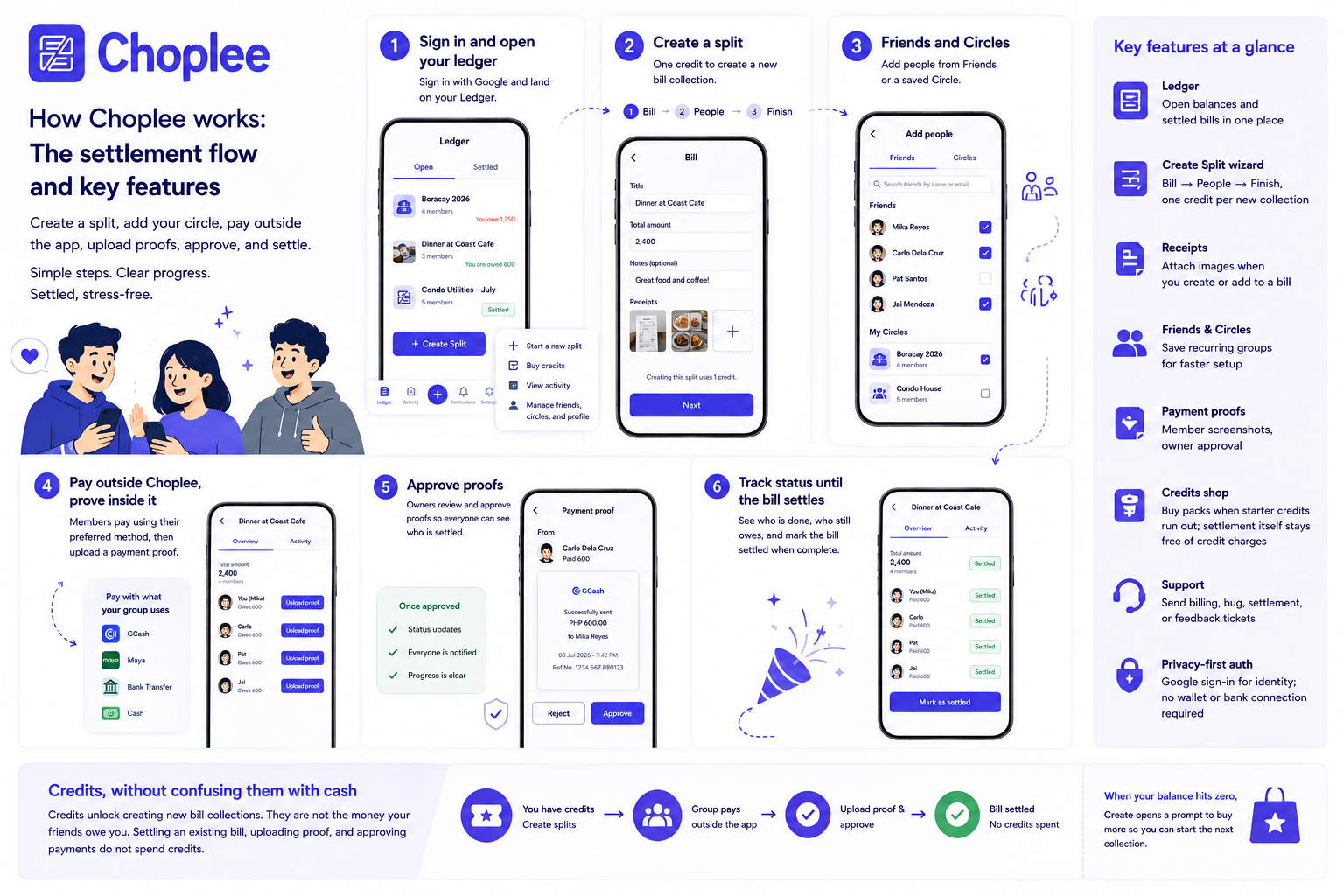
The settlement loop, start to finish
Choplee is built around one complete loop: create a shared bill, add your circle, let members settle their shares outside the app, collect proofs, and approve until the ledger is clean. This guide walks through that flow and the features that support it.
You do not need every feature on day one. Most groups get value from create → people → proof → approve. Friends, circles, and credits become more useful as you split with the same people again.
1. Sign in and open your ledger
Sign in with Google to create your Choplee profile. New accounts start with starter credits so you can create bill collections right away. After onboarding acknowledges Terms and Privacy, your home screen is the Ledger — a list of open and settled balances your circle can follow.
From the Ledger you can open an existing bill, start a new split, buy credits, or jump to Settings for profile, friends, and circles.
2. Create a split
Creating a bill collection uses one credit. The create flow is a short wizard:
- Bill — title, amount, and receipt images so everyone sees what was shared
- People — add Friends, a Circle, a Gmail, or a name, then set each person’s share
- Pay — notes and QR codes for where to send money
- Finish — confirm; Gmail members get email, name-only members get a shareable settle link
3. Friends and Circles
Friends are other Choplee users you save for next time. Circles are named groups of friends — for example “Boracay 2026” or “Condo house.” Bill members do not all need accounts: you can add a Gmail or a name and send a personal settle link. Friends in Settings still must already have accounts so you can search and reuse them.
When you create a split often with the same people, picking a circle is faster than rebuilding the member list from scratch.
4. Pay outside Choplee, prove inside it
Choplee does not move money. Members pay their share with GCash, Maya, bank transfer, cash, or whatever your group already uses. After paying, they upload a payment screenshot as proof on the bill.
The bill owner reviews each proof and approves it when the transfer checks out. That approval updates settlement status so the group can see who is done and who still owes — without digging through chat threads.
5. Track status until the bill settles
Bill detail views show membership, owed amounts, proof status, and receipts in one place. Owners can adjust an owed amount when the group agrees on a correction, approve proofs, and mark the collection settled when everyone is complete.
Members get notifications and email updates for key events — being added to a bill, proof activity, approvals, and settlement — so progress does not depend on one person chasing the group in chat.
Key features at a glance
Here is the feature set that supports the flow above:
- Ledger — open balances and settled bills in one home screen
- Create Split wizard — Bill → People → Pay → Finish, one credit per new collection
- Guest settle — Gmail or name-only members pay from a personal link without signing up
- Receipts — attach images when you create or add to a bill
- Friends & Circles — save recurring groups for faster setup
- Refer friends — share your link; +10 credits when they settle their first owned bill
- Payment proofs — member screenshots, owner approval
- Credits shop — buy packs when starter credits run out; settlement itself stays free of credit charges
- Support — send billing, bug, settlement, or feedback tickets from the app
- Privacy-first auth — Google sign-in for identity; no wallet or bank connection required
Credits, without confusing them with cash
Credits unlock creating new bill collections. They are not the money your friends owe you. Settling an existing bill, uploading proof, and approving payments do not spend credits. When your balance hits zero, Create opens a prompt to buy more so you can start the next collection.
Try the flow with one real bill
Pick a live expense — dinner, taxi, or a weekend share — create the split, add your circle (or a name if they are not on Choplee yet), and walk one payment through proof and approval. That loop shows how Choplee keeps who owes visible until the group is settled.
When you are ready, open Choplee and create your first collection.